MetaMask Wallet Review


Why Trust Web3Bet
Our team of experts has independently reviewed and evaluated all the products and services featured on this page to ensure you receive accurate and reliable information
Back in early 2025, I noticed a funny pattern: every time I introduced a friend to crypto, the conversation somehow ended with, “Wait… so how do I actually keep my coins safe?” That’s usually when MetaMask enters the chat. It’s one of those tools you might install once and then forget how much you rely on — until the day you try to swap tokens or log into a dApp without it.
MetaMask in 2025 — more than “just a wallet”
When it first appeared, MetaMask was simply a place to hold your Ethereum. Today, it’s closer to a full-on passport for the decentralized web. It’s still self-custodial — meaning you, and only you, hold the keys — but it now integrates smoothly with a growing range of dApps, DeFi platforms, and even NFT marketplaces.
For context, we tested it against more “traditional” crypto wallets like hardware devices and basic bitcoin apps. The biggest difference? MetaMask doesn’t just store your assets; it lets you move, swap, and stake them without leaving your browser or phone. That flexibility is exactly why it’s stayed relevant in a market that can make yesterday’s tools feel outdated overnight.
Not everything is perfect, of course — the first-time setup can be intimidating, and gas fees on Ethereum aren’t going anywhere. But if you want a wallet that works like a control center for your crypto life rather than a dusty storage box, MetaMask is still a front-runner in 2025.
Pros and Cons — from real-world use
After spending a few weeks running my transactions through MetaMask, here’s how the trade-offs look when you step away from the marketing blurbs and into actual usage.
What works well:
- Easy to get around – The interface feels natural whether you’re new to crypto or have been swapping tokens since 2017.
- Smooth dApp connections – DeFi platforms, NFT marketplaces, staking dashboards — it all links up without a fight.
- Broad network reach – Still Ethereum-focused, but with steady progress toward more chains.
- Full transparency – No sneaky fees; you always see what’s going in and out.
What can frustrate you:
- Initial learning curve – If blockchain jargon still sounds like Klingon to you, expect a short acclimation period.
- Security is on you – Lose your seed phrase, and no support ticket will save you.
- Staking feels limited – Native options exist, but they’re not yet a replacement for dedicated staking services.
- Occasional KYC hurdles – In certain regions, you may still be asked for extra verification.
So, is MetaMask a good everyday wallet? In my book, yes — if you’re the kind of person who likes holding the steering wheel rather than riding in the back seat.
A quick look back: how MetaMask came to be
MetaMask first appeared in 2016, built by developers who believed the average person should have a key to the decentralized world. Early versions were bare-bones — a simple Ethereum wallet you could run from your browser. But each update added something meaningful: better security, smoother UX, and more network compatibility.
It’s interesting to think that, back then, most wallets were still modeled after bitcoin storage tools. MetaMask broke that mold by acting as a gateway to a growing web3 universe. The team leaned heavily on community feedback, which is why many of the features you see today — from network customization to token swaps — came directly from user requests.
Key features worth noting
- You own the keys – Non-custodial means full control; your crypto stays yours.
- dApp integration baked in – No need for workarounds; you can connect straight to protocols from your browser or mobile app.
- Token flexibility – Supports ERC-20 tokens out of the box and is branching into more chains.
- Privacy-first design – Your private data is encrypted locally, so no one else can peek.
If you download MetaMask today, you’re not just grabbing another wallet — you’re stepping into a toolkit that’s quietly grown into one of the most versatile hubs in the web3 space.
Everyday experience with MetaMask
When I first introduced a friend to MetaMask, their reaction was, “That’s it? I thought wallets were supposed to look complicated.” That’s pretty much the point — MetaMask’s design doesn’t try to intimidate you with endless menus. Whether you’re running it on desktop or through the mobile app, the layout feels clean, and the prompts actually help rather than nag. From installing the extension to making your first DeFi swap, the onboarding flow is straightforward enough that you rarely need to leave the app to look up “how-to” guides.
If you’re about to install MetaMask, expect to be walked through each step, from creating your wallet to securing it. The process builds confidence, not confusion — which is rare in crypto tools.
Wallet type & how security works
One of the top questions I get is, “So… is MetaMask custodial or not?” The short answer: it’s non-custodial — you hold the keys, you hold the power (and the responsibility). This setup comes with several protections:
- Local encryption of your sensitive data
- 2FA support on certain integrations
- Built-in backup and recovery tools in case you lose your device
The flip side is obvious — no one can reset your password if you lose your seed phrase. Compared to custodial services, it’s a bigger responsibility, but also far more control over your funds.
The backup that saves you (if you do it right)
During setup, MetaMask hands you a 12- or 24-word seed phrase. Treat it like a fireproof safe key: keep it offline, never share it, and store it somewhere that can’t be accidentally thrown away. This one string of words can restore your wallet if your device is lost or damaged. Ignore this step, and no amount of tech support will help you recover your funds later.
KYC and privacy balance
By default, you can create and use MetaMask without submitting any KYC — that’s part of its decentralized DNA. That said, the moment you hook it into a fiat gateway or certain centralized exchanges, expect possible ID checks. It’s a middle ground between absolute privacy and the reality of modern regulations.
Fees you’ll run into
MetaMask doesn’t tack on hidden service charges for holding or sending crypto. What you will pay are network (gas) fees, especially on Ethereum, and those change based on traffic. Some days, sending $10 can cost you cents; other days, it’s dollars. Planning transactions when the network is quiet can save you more than you think.
Staking inside MetaMask
By 2025, staking through MetaMask has gone from “nice theory” to “usable feature.” While it’s not yet universal for every token, integrations with lending platforms and liquidity pools mean you can put idle assets to work directly inside the wallet. The options are still growing, and we’ll likely see much smoother, one-click staking in future updates.
Rewards — not MetaMask’s main game (yet)
Some wallets lure users with badges or daily bonuses. MetaMask hasn’t gone down that route, instead focusing on reliability and compatibility. Still, certain connected dApps offer rewards, and MetaMask is clearly leaving the door open for future incentive systems.
Why dApp integration is still the ace in the sleeve
The real magic of MetaMask is how naturally it plugs into the decentralized web. Whether you’re browsing NFT collections, farming yields, or just keeping an eye on your portfolio, the connection is instant and trusted. In a way, the wallet has become less of a storage app and more of a passport — one that gets you into almost every corner of web3 without asking you to stand in line.
Networks, coins, and NFTs — what MetaMask supports now
When MetaMask first landed in 2016, it was strictly an Ethereum-and-ERC-20 story. Fast-forward to 2025, and the menu has expanded:
- Multicurrency flexibility – It’s branching out into assets from other networks beyond Ethereum.
- Network variety – You can link to testnets, Binance Smart Chain, and select Layer 2 solutions without jumping through hoops.
- NFT handling – You can store, view, and even send your digital collectibles directly from the wallet, no extra apps required.
If you’re after a wallet that won’t corner you into a single blockchain, MetaMask’s growing network list is a big plus.
Interface — clean, responsive, and adaptable
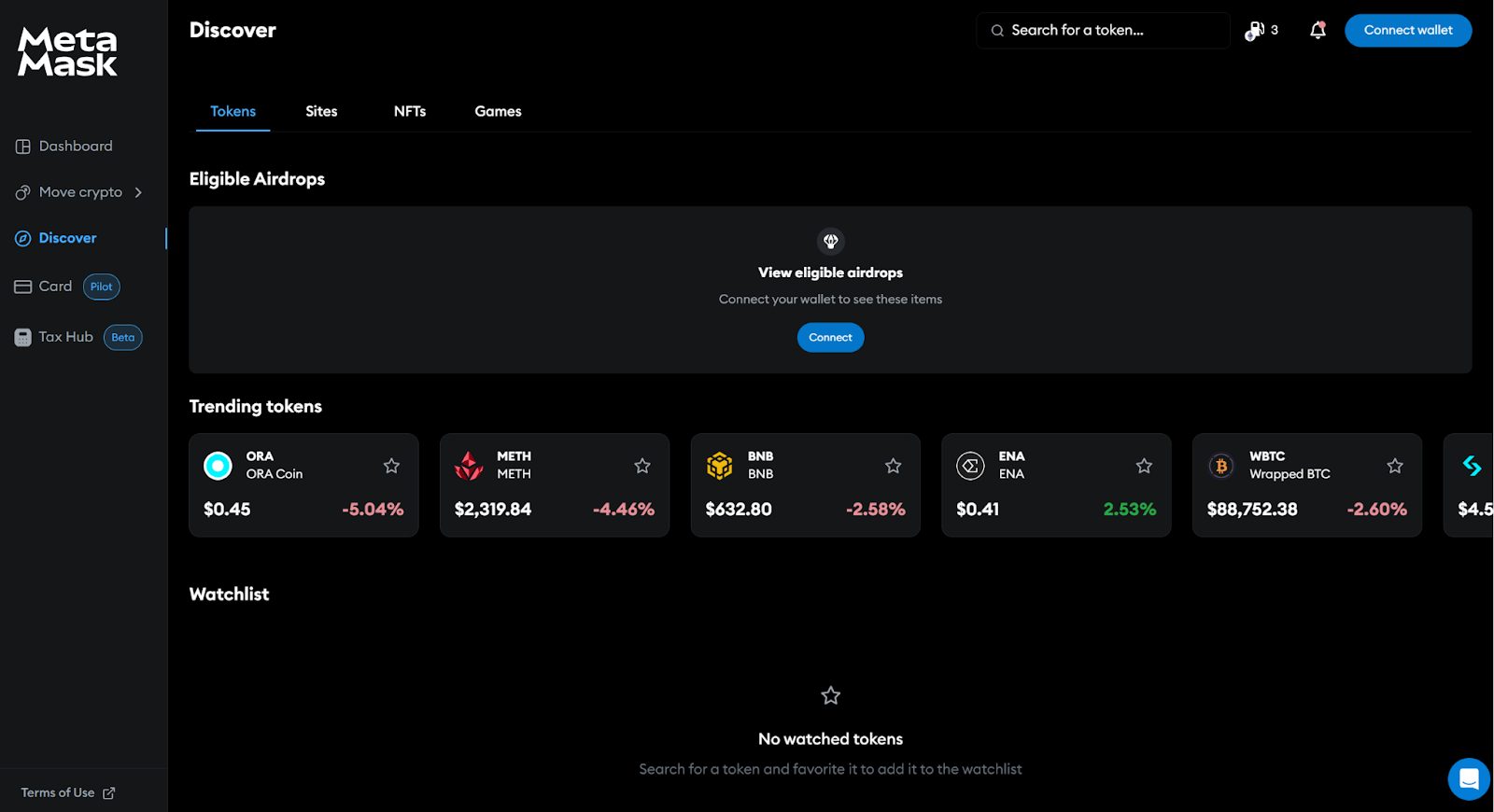
One thing MetaMask has nailed is the balance between simplicity and depth. The mobile app in particular feels polished without being overwhelming:
- Navigation that makes sense – Buttons are where you expect them to be.
- Smooth interactions – Animations and quick-load menus keep things fast.
- Your wallet, your way – A fair amount of customization so you can tweak it to your liking.
Whether you’re making your first token swap or connecting to a DeFi protocol, the design rarely gets in your way.
Setting up your account — what to expect
Creating a MetaMask account is a short, predictable process:
- Install from the right source – Either the official site or your app store (double-check the link).
- Generate your wallet – Follow the prompts, and write down your 12- or 24-word seed phrase.
- Lock it down – Choose a strong password and enable any extra security options available.
- Explore – Start with token management, transaction history, and dApp connections to get familiar.
Every step is clearly explained, so even if it’s your first crypto wallet, you won’t feel lost.
Buying and selling — without leaving the wallet
MetaMask makes it easy to get in and out of positions:
- Built-in purchase tools – Connect to fiat on-ramps for direct crypto buys.
- Exchange access – Many DEXs can be reached straight from the wallet for token swaps.
- Helpful prompts – In-app guides walk you through trades, which is great if you’re still learning the ropes.
Sending and receiving — simple but secure
Moving funds in or out takes only a few clicks:
- Clear send/receive options right on the main screen
- Full transaction details before you hit confirm — including network fees and confirmation time estimates
- Local encryption so every transfer stays secure
The transaction log also keeps you from wondering “Did that go through?” — everything’s recorded.
Swapping tokens inside MetaMask
The built-in exchange is one of the wallet’s underappreciated perks:
- Straightforward flow – Pick your tokens, check the rate, and confirm.
- Aggregated pricing – Pulls from multiple liquidity sources so you’re not stuck with a bad deal.
- Live rate updates – No guessing what the market’s doing mid-swap.
It’s fast enough that you don’t feel tempted to jump to an external site just to make a trade.
Extra touches that keep it relevant
Beyond the basics, MetaMask is experimenting with features that point to where wallets are headed:
- Deep dApp integration – DeFi, NFTs, web3 gaming, all within reach.
- Potential lending tools – Still in development, but could add another layer of utility.
- Themes and personalization – Small touch, but nice if you want your wallet to feel less generic.
Taken together, these extras help MetaMask stay competitive in a space where yesterday’s leader can become today’s afterthought.
Final thoughts on MetaMask in 2025
If I had to sum up MetaMask this year, I’d call it a rare mix of familiar and forward-looking. It started life as a simple Ethereum bridge and has grown into a multi-chain hub that still feels approachable. For anyone trading in their old bitcoin-only wallet for something more versatile, MetaMask checks the boxes: easy onboarding, strong security, smooth dApp access, and enough advanced tools to keep power users happy.
Sure, the learning curve is steeper if you’ve never touched crypto before, and yes, Ethereum gas fees can sting — but the trade-off is full control and access to almost every corner of web3. In a market where wallets come and go, MetaMask hasn’t just survived; it’s still setting the pace.
FAQ
What is a MetaMask wallet?
A non-custodial, decentralized wallet that lets you store Ethereum-based assets and connect directly to blockchain apps, from DeFi platforms to NFT marketplaces.
What’s the MetaMask app, and how’s it different from the desktop version?
It’s essentially MetaMask in your pocket — the mobile version has the same core features, letting you swap, send, and connect to dApps while you’re away from your computer.
How do I install and get started?
Grab it from the official site or your app store, set a strong password, and write down your 12- or 24-word seed phrase. That phrase is your lifeline — lose it and you lose access.
What kind of wallet is it, and how does that affect security?
It’s non-custodial, meaning you hold the private keys. This gives you maximum control but also makes you fully responsible for protecting your access.
Can MetaMask handle more than Ethereum — and does it support NFTs?
Yes. It’s branching into multiple networks and includes tools to store, view, and trade NFTs directly from your wallet.